Between "the boxes arrived" and "the network works" sits a layer of physical work most IT providers can't do and most cablers don't understand. We live in that layer: switches, routers, firewalls, and network hardware racked, powered, patched to a documented map, and commissioned — for your business or your IT provider.
Prefer to talk? Call Chris — 0412 853 618
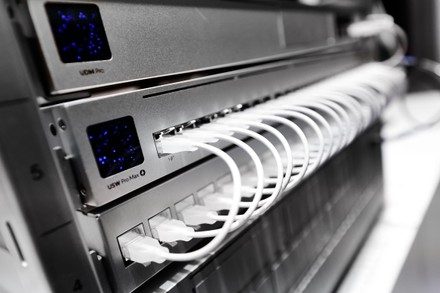
One switch or a whole comms room of hardware — send the equipment list and Chris will come back with straight advice and a fixed price. Prefer to talk? Call 0412 853 618. No pushy sales, just solid work.
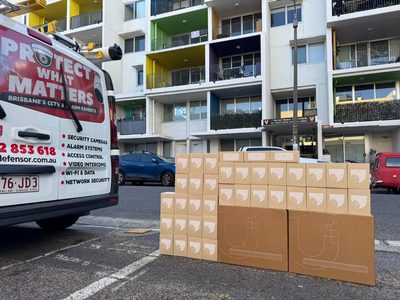
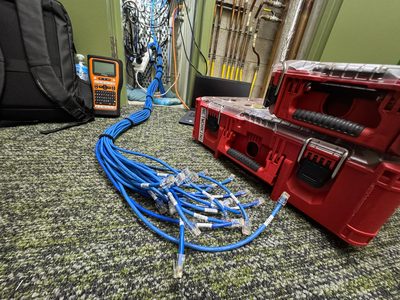
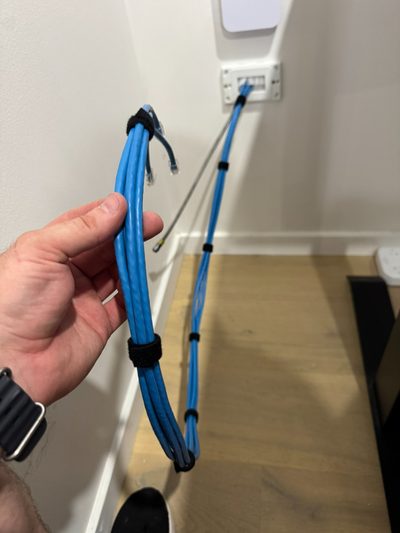
Network hardware doesn't install itself, and the gap shows. Switches balanced on shelves, routers dangling by their power cords, firewalls configured beautifully and cabled appallingly — the physical layer of IT infrastructure installation is where remote-first IT providers go blind, and where a decade of small shortcuts compounds into the comms room nobody wants to touch.
Unified Network Solutions installs IT infrastructure across Brisbane and South East Queensland the way it should be done: hardware racked and secured, powered through protected circuits, every port patched to a documented map with leads at correct lengths, PoE budgets calculated rather than hoped, and the whole build labelled and photographed at handover. We work directly for businesses, and as the white-label field arm for IT companies and MSPs who design networks but don't carry installers. ACMA Open Cabler #42489, so the cabling layer is certified, not just connected. Switch installation is where most of it converges: the switch installation decides what every connected device experiences. A network switch installation done with PoE budgets and VLANs planned is infrastructure; a switch installation done by box-swap is a future outage.
Switch installation is the bread and butter of IT infrastructure work, and doing it properly is a sequence, not an event: racked with rails or shelf as the chassis demands, powered through the UPS with the load checked, uplinked to the router or core on the documented topology, and then — the part that separates professionals — every port patched deliberately. Panel port to switch port on a recorded map, leads at measured length, labelled at both ends.
Routers and firewalls get the same treatment plus placement sense: in the cabinet and on protected power, not on top of it; reachable for the IT provider who manages them; and cabled so the WAN, LAN, and management paths are visually traceable. Half of all "firewall problems" we attend are actually installation problems wearing a firewall's badge.
For UniFi networks we take it to fully commissioned — gateway, switching, and access points adopted, configured, and handed over with your admin credentials. For other platforms, we deliver to verified power-on and let your IT team drive their own config.
Modern networks power themselves through their switches — phones, access points, cameras, door controllers. The switch's power budget is finite, and exceeding it fails strangely rather than loudly.
The budget is real. A "24-port PoE switch" doesn't promise 24 ports of full power — it promises a total wattage shared across them. Load it past the budget and devices brown out unpredictably, usually the far-cable, high-draw ones first, in ways that look exactly like flaky WiFi or dying cameras.
We do the arithmetic. Every powered device's actual draw, summed against the switch's budget, with headroom for the devices you'll add — calculated at design time, written into the quote. PoE+, PoE++ and port priorities specified where the loads demand them.
The cable matters too. Power over marginal cabling arrives diminished and hot. As cablers, we test the runs carrying high-wattage PoE rather than assuming them — the brownout you never have is the one we calculated away.
Commissioning is where IT infrastructure installation earns its name — the difference between installed and working. After the racking and cabling, every piece of network equipment gets verified: power draw where it should be, links up at the right speeds, PoE delivering to the loads, management interfaces reachable from where they need to be reached. Problems surface in our visit, not your Monday — and the fix happens while the ladder's still up.
The build is documented as it happens — rack elevation, port map, cable register, photos — because hardware without documentation is technical debt with a power light. The pack lands with you and your IT provider the same day, in a format their tools can live with.
Decommissioning rides along where it's needed: old hardware out, abandoned cabling stripped, e-waste handled, and the rack left better than the new gear found it. Most infrastructure refreshes are half installation, half archaeology — we quote both honestly.
The same physical discipline serves every stage a business network moves through — and the same team handling all of them is why nothing falls between the cracks.
Greenfield IT infrastructure installation for new premises — cabinet, cabling, switching, routing, WiFi, and UPS delivered as one coordinated build, live before move-in day.
Aging network equipment swapped for current gear in planned, low-downtime cutovers — with the old hardware decommissioned and the documentation updated rather than orphaned.
The growth jobs: bigger switches, more PoE, extra access points, the second cabinet — added to the documented baseline instead of bolted on around it.
Whole-infrastructure moves as part of an office relocation — documented before powering down, rebuilt identically at the destination, verified service by service.
Inherited messes brought up to standard — the network equipment is usually fine; the installation around it is what gets rebuilt.
For MSPs and multi-site groups: scheduled installation capacity on call — same standard, every job, without hiring field staff.
Most of our IT infrastructure work involves three parties — you, your IT provider, and us. The division of labour is clean and deliberately drama-free.
Your MSP or IT team specifies the hardware and owns the configuration — their relationship, their management stack, their call. We don't poach and we don't second-guess their architecture in front of you.
Racking, power, certified cabling, patching to the documented map, labelling, verification — the field work they'd otherwise subcontract to whoever answers the phone.
Documentation lands with both of you. Their remote sessions start from a switch that's cabled correctly and labelled honestly — which makes their support faster and your bills smaller.
For IT companies and MSPs: this is a standing white-label service. Your brand on the paperwork, our hands on the hardware, and your engineers never on a ladder in Logan again. Equipment rollouts, site builds, and rack and stack — quoted per job or arranged as standing capacity.
What's going in, where it's going, who configures it — plus the PoE arithmetic and power check that catch problems while they're still free to fix.
Racking, cabling, patching, commissioning, and documentation itemised — with hardware supplied at trade pricing where you want one accountable vendor.
Built to the plan, around your hours — every device verified powered, linked, and reachable before we call it installed.
Elevation, port map, register, photos — same day, to you and your IT provider. Then the config work starts from solid ground.
The physical layer is where IT projects quietly succeed or noisily fail.
ACMA Open Cabler #42489 with an IT background — the rare combination that means the cabling, the racking, and the network logic agree with each other.
Every install ends in verification and documentation — the difference between hardware that's present and infrastructure that's working.
White-label installation capacity for IT companies — your design, our delivery, no poaching, complete discretion.
It scales with the equipment list. A single switch installation — racked, cabled, patched, and verified — starts around $300–$600 in labour. A complete small-business infrastructure build (cabinet, switch, router, UPS, access points, all cabling) typically runs $2,500–$6,000 plus hardware. Larger and multi-site projects are quoted to scope, always fixed-price. Call Chris on 0412 853 618 with your equipment list.
Yes — that's a standard arrangement. Your IT provider or MSP specifies and configures; we do the physical layer: racking, power, patching every port to a documented map, labelling, and power-on verification. They remote in to a switch that's already cabled correctly, and the documentation goes to both of you. White-label if they prefer their brand on the work.
Every PoE switch has a total power budget shared across its ports — and modern networks lean on it hard: phones, access points, and cameras all draw power through the switch. Exceed the budget and devices brown out unpredictably, usually the most distant ones first. We calculate the actual draw of every powered device against the switch's budget during the design, so the network doesn't fail by maths after it passed by demo.
To the level the job needs. For UniFi deployments we do full configuration — adoption, VLANs, WiFi, the lot. For enterprise gear managed by your IT team or MSP, we rack, cable, and verify to power-on, then hand over for their configuration. We're deliberately good at both modes: complete delivery for businesses without IT support, clean handover for businesses with it.
Yes — a dead switch is a dead business, so swap-outs get priority scheduling. If you have a documented network (port maps, labelled cabling), the physical swap is under an hour. If you don't, this is the incident that demonstrates why documentation matters — we'll get you running first, then quote the documentation pass so the next failure is boring.
Physically and, for UniFi gateways, fully. Firewalls and routers get racked, powered through the UPS, cabled to a documented topology, and verified. Configuration beyond the UniFi ecosystem is usually your IT provider's domain — we make sure the box they're configuring is installed properly and reachable, which is more than half of most "firewall problems".
Yes — multi-site hardware rollouts are a core service for MSPs and growing groups. Same equipment standard, same installation method, same labelling and documentation at every site, delivered to a schedule. Site one's documentation becomes the template, and every subsequent site gets faster and cheaper.
We service Brisbane CBD, North Brisbane, South Brisbane, Gold Coast, Sunshine Coast, Ipswich, Logan, Moreton Bay, Redlands, and the wider South East Queensland region. For larger projects, we can service regional Queensland by arrangement.
Either works. We supply UniFi and other commercial network equipment at trade pricing where you want one accountable vendor for hardware and installation — or we install gear you've purchased or your IT provider has specified. The one thing we'll always do first is sanity-check the list against the site: the wrong-depth switch and the under-budgeted PoE model are cheaper to catch before the boxes ship.
A single switch swap is under an hour on a documented network. A complete small-business build — cabinet, switch, router, UPS, access points, cabling — typically runs one to two days including commissioning and documentation. Multi-site rollouts are scheduled per site with the first site setting the template. Every quote includes the timeline, and after-hours installation is available where cutover downtime matters.
IT infrastructure installation, network equipment installation, and switch installation across Brisbane CBD and metro, Logan, Ipswich, Redlands, Moreton Bay, the Gold Coast, and the Sunshine Coast — direct for businesses, white-label for the IT companies that serve them. From one urgent switch swap to a multi-site rollout staged over a quarter: racked, cabled, commissioned, and documented, at a fixed price you saw before the work started. Switch installation, rack builds and cabling as one job — every switch installation configured, labelled and documented before handover.
Send the equipment list — or the photo of the shelf where a rack should be — and we'll quote the build: racked, powered, patched, verified, and documented. From cabling to switch installation to the rack it lives in — one trade, one switch installation standard, one accountable phone number.
Call 0412 853 618 Get a Quote Online Unified Network Solutions